An account-wide report of every call handled by your AI agents, across all agents.
Open it from the portal sidebar under Agents → Activity. The per-agent Activity tab inside Agent Studio remains the drill-down for a single agent — this page is the roll-up.
This page requires an active AI Agent Bundle from the Marketplace. Without AI agents, the report is empty.
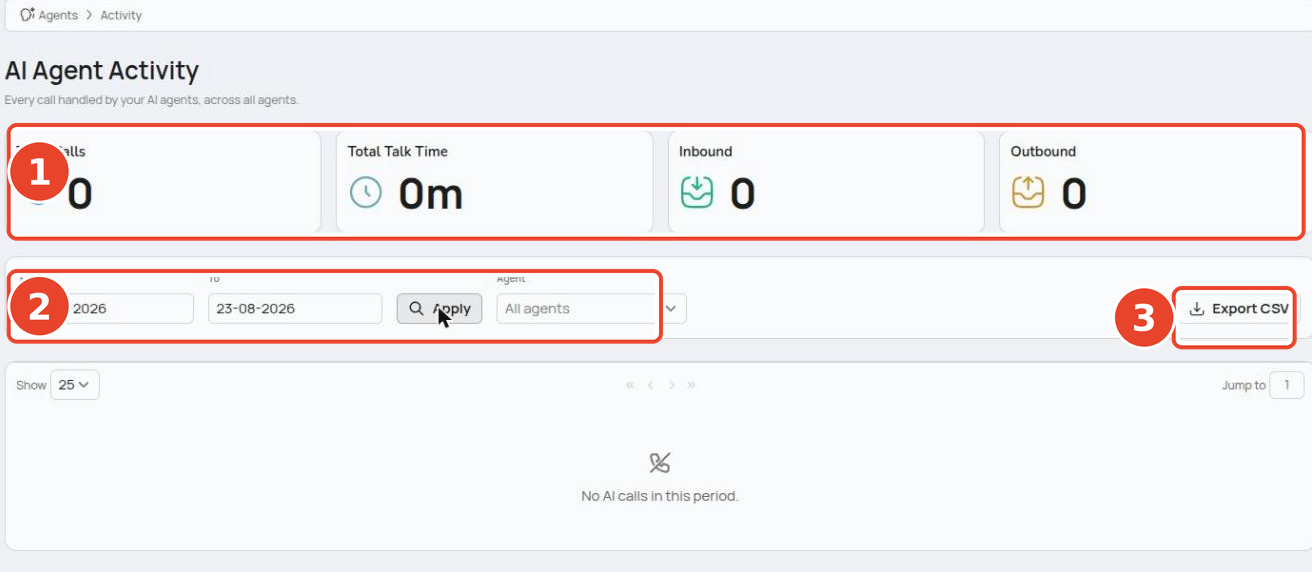
① the four summary cards ② the From / To date range and Agent filter ③ the Export CSV button.
¶ Summary cards
Four cards across the top summarise the current filters.
| Card | Shows |
|---|---|
| Total Calls | All AI calls in the period |
| Total Talk Time | Combined duration of those calls |
| Inbound | Calls answered by your agents |
| Outbound | Calls placed by your agents |
Total Calls may show a small "N unclassified" line — calls that couldn't be tagged as inbound or outbound — so Inbound + Outbound can be slightly less than the total.
¶ Filter the report
- Set the From and To dates, then click Apply.
- Pick an agent from the Agent dropdown to narrow to one. It defaults to All agents.
¶ The call list
One row per AI call, 25 rows per page. If nothing matches, the list reads "No AI calls in this period."
| Column | Shows |
|---|---|
| Date | When the call happened |
| Agent | Which AI agent handled it |
| Skill | The skill that ran |
| Number | Direction icon plus the caller's name/number, or the campaign contact for outbound |
| Duration | Call length |
| Outcome | How the call ended |
| Actions | Open the transcript / call outcome |
¶ Export to CSV
Click Export CSV to download the calls for the current filters.
The CSV export is limited to a 92-day date range (the on-screen list is not). Pick a range of 92 days or less, or you'll see "Please select a date range of 92 days or less."
¶ Related pages
- AI Agents — the hub for Agent Studio.
- Skills — how agents handle inbound and outbound calls.
- Campaigns — outbound calling by your agents.
- Call reports — activity for your non-AI calls.