¶ Uniden EVOC2 Handset
- How to transfer a call
- How to connect via network cable.
- How to connect WiFi Adapter
- How to connect Bluetooth headset
- How to access your voicemail
- How to set your Busy lamp field (BLF) side keys
- Call Waiting - Enable/Disable
- Your content here
¶ Connecting to the Device
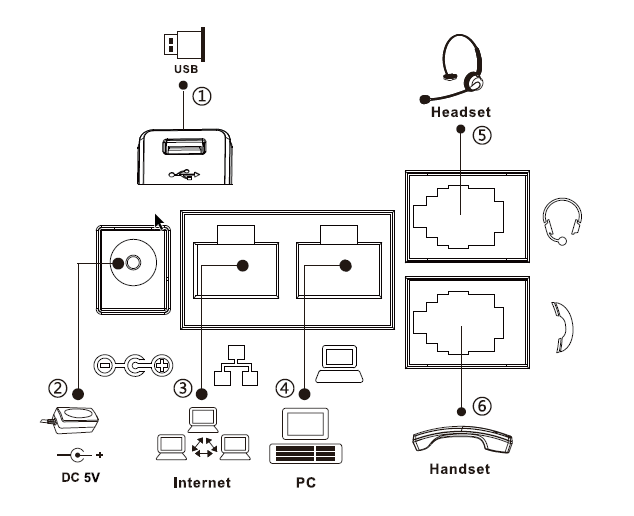
Please connect power adapter, network, PC, handset, and headset to the corresponding ports as described in below diagram 1.1.
Diagram 1.1
① USB port: connect USB device (USB flash disk, WIFI Dongle)
② Power port: connect the power adapter.
③ Network port: connecting local area network or Internet.
④ PC port: the network port connect to the computer.
⑤ Headset port: connect headset.
⑥ Handset port: connect IP Phone handset.
¶ Making a call
-
Pre-dialing: enter the phone number and pick up the handset.
-
Direct dialing: lift the handset and enter the phone number.
-
Handsfree: enter phone number and press or vice versa.
-
Headset: enter phone number and press or vice versa.
¶ Accepting a call
-
With the handset: pick up the handset.
-
With a headset: press .
-
With the handsfree: press .
¶ Putting a call on Hold
-
Press Hold soft key, caller is put on hold.
-
To retrieve the call Press Resume soft key.
Note: with more than one active call, select desired call with the
navigator keys and use the corresponding soft keyt o hold
or resume.
¶ Parking a call
-
When on a call, Press XFER Dail 700 (that will play the park number back to you)
-
Press XFER to complete the Transfer and end call.
-
To pickup the call fron any other device, dial the number that was given to you to pickup the parked call. Example 701 or 702.
***Note that the buttons on EVOC handsets will appear as red which indicates someone is waiting on that line
¶ Paging Extension (EVOC2 Handset Only)
-
Dail *80 Extension and press “Dail”
-
Dail *80 (press BLF Key) and press “Dail”
*NOTE: You will only be able to page an extension which has a EVOC2 handset. e.g PC APP/Mobile > EVOC2 Handset will work. The paging system will not work if the extension you are trying to page is only registered to a PC APP/Mobile APP *