¶ How to setup Mobile App
To Access the QR Code for your Android or iOS mobile App.
- Download Mobile APP. To download the our mobile application, please select one of the following:
Android Download: https://play.google.com/store/apps/details?id=com.vocphone.voc.android
Apple iOS Download VOCPhone
-
Open VOCPhone app after download has completed.
-
Two options will appear, sign in with QR Code or with Email Address.
Option 1 - Tap QR CODE to SCAN QR Code with phone camera
Option 2 - Type in your emailed that you have setup for your USER
To Update the email for you users follow the below steps
-
Login to the Customer Portal
-
Click Users
-
Select the user within your list.
-
Click “Edit”
Please note: Ensure your user has the correct email address set under your user profile as the QR is sent directly to that email and does expire after it has been used.
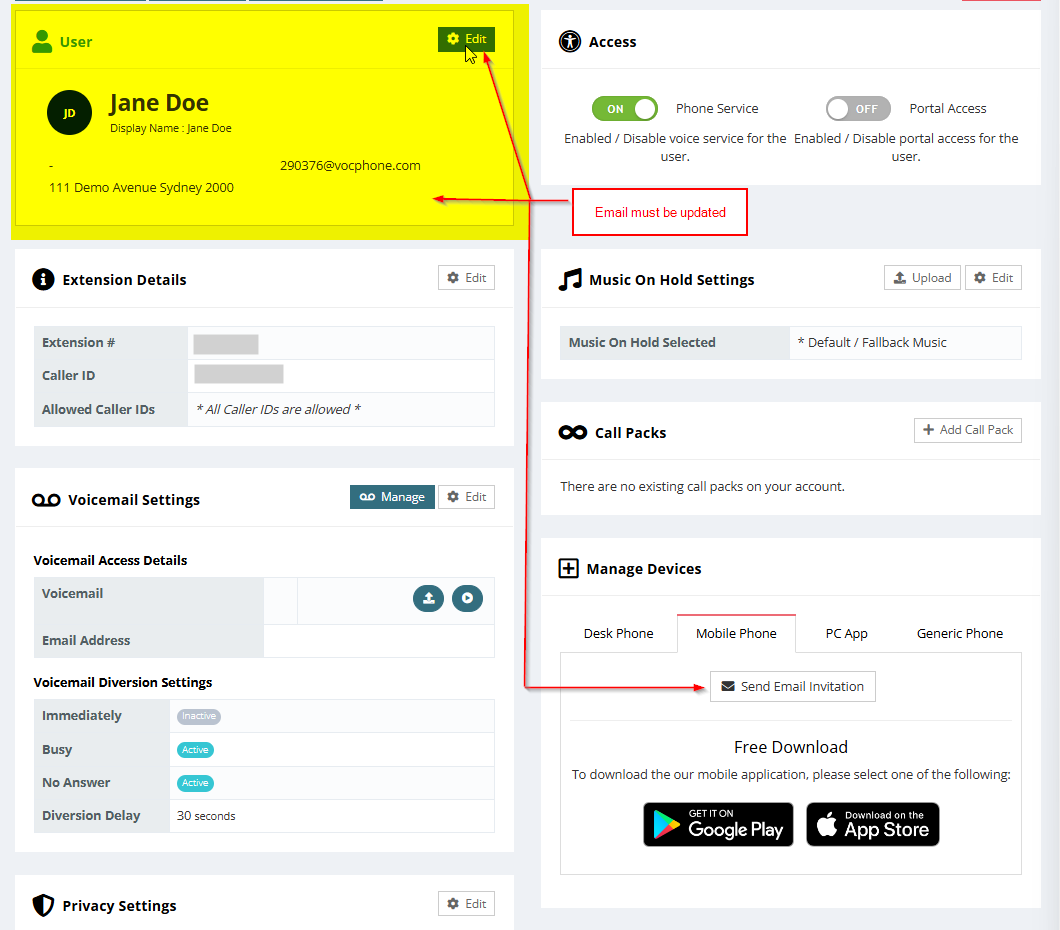
To send a Mobile app invitation via email go to “Manage devices” select Mobile Phone tab and Click on “Send Email invitation”